
Embedding Inclusive Design at Scale
The Opportunity
When I joined Staples, the organization was navigating a period of significant change. Shortly after my arrival, the accessibility research team was impacted by organizational restructuring, and the UX organization experienced a reduction in resources. At the same time, the company was working to strengthen its approach to digital accessibility and create more inclusive experiences across its products.
As a designer with both professional expertise and lived experience with disability, I saw an opportunity to help make accessibility a natural part of the design process rather than a final compliance checkpoint. My goal wasn’t simply to improve accessibility. It was to build a sustainable practice that empowered every designer to create more inclusive experiences.
My role focused on creating the systems, resources, and workflows needed to embed inclusive design into everyday product development.
Creating an Foundation
he first challenge wasn’t fixing accessibility issues—it was enabling teams to work more effectively.
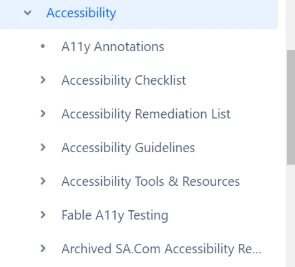
Accessibility guidance already existed, but it was scattered across multiple documents, difficult to navigate, and inconsistent between teams. I began by auditing existing documentation, identifying gaps, and consolidating everything into a centralized accessibility hub that became the team’s single source of truth.
The hub included:
Accessibility annotation guidance for design handoff
UX and engineering accessibility checklists
Accessibility issue triage guidance
Fable testing documentation and report templates
Issue tracking resources
Curated accessibility learning materials
This foundation made accessibility knowledge easier to discover, easier to maintain, and easier to apply throughout the product lifecycle.
Aligning Teams Around a Shared Vision
Staples had recently introduced Fable, a platform that connects organizations with disabled users to evaluate digital experiences. While the tool offered valuable insights, designers were hesitant to adopt another workflow, and teams lacked a consistent process for translating research into action.
Rather than introducing another process, I first worked to understand how teams collaborated today.
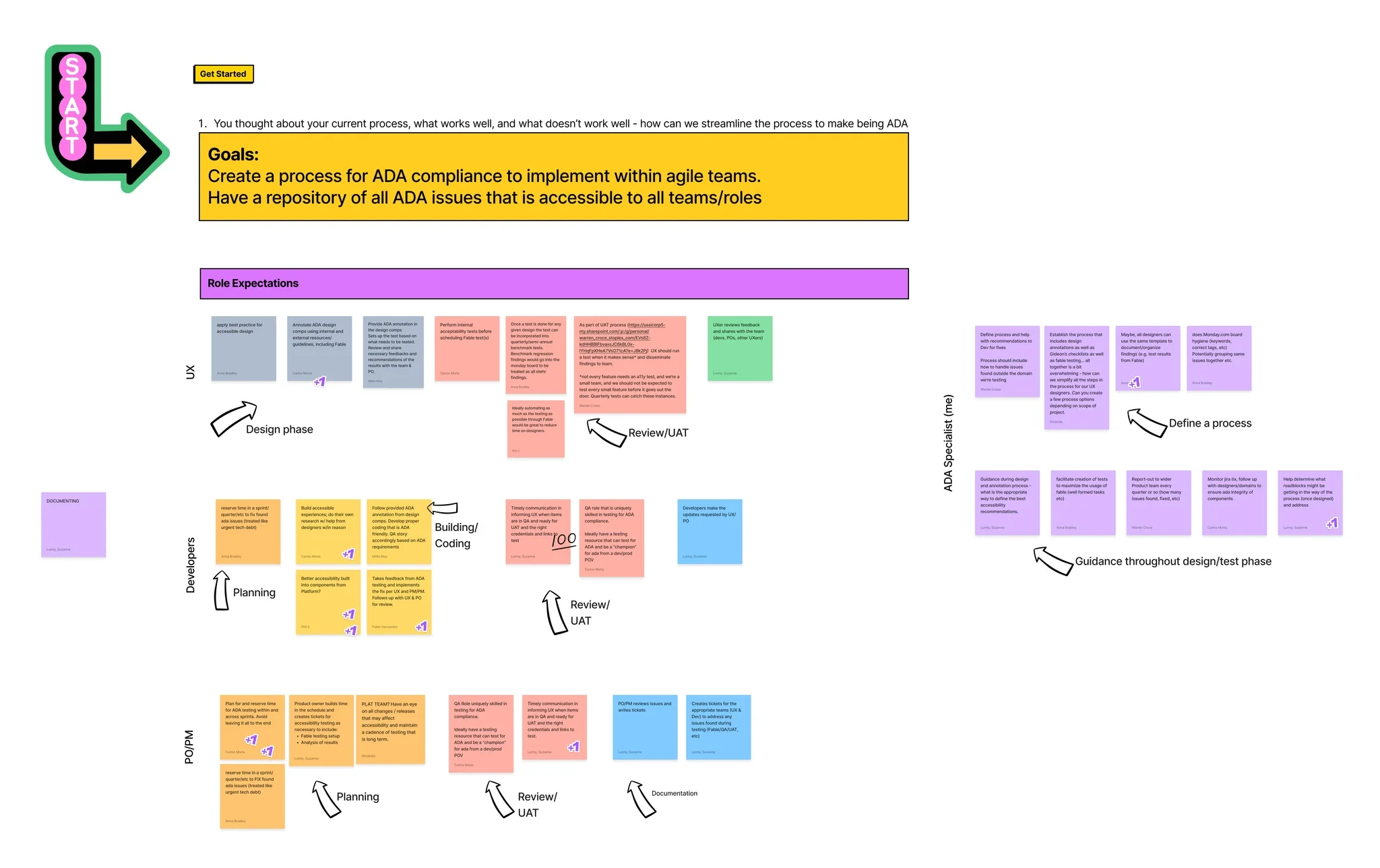
I facilitated cross-functional workshops with designers, product managers, and engineers to uncover pain points, clarify ownership, and identify opportunities for a more consistent approach.
Together, we aligned on:
Shared responsibilities across UX, Product, and Engineering
Where accessibility should be integrated throughout the design lifecycle
Existing workflow challenges
Opportunities to create a repeatable, scalable process
These workshops ensured the solution reflected real team needs rather than assumptions.
Designing the Right Workflow
Using workshop insights, I translated team feedback into a clear set of design requirements.
The workflow needed to:
Support Fable-generated reports and manually identified issues
Allow both individual issue logging and bulk uploads
Be simple enough for designers to adopt with minimal training
Organize issues by product area for easier prioritization
Reduce administrative effort while improving consistency
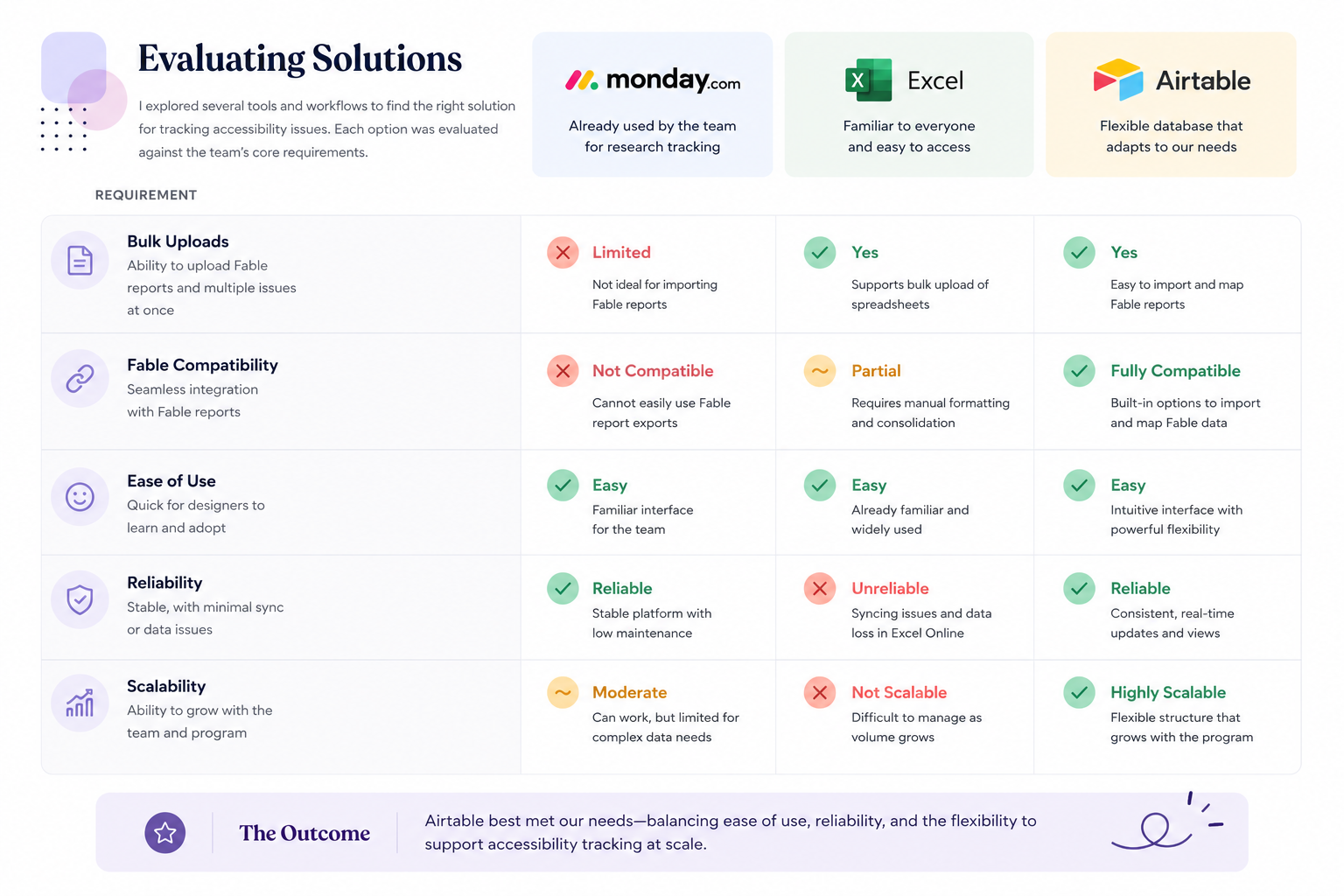
Instead of selecting a tool first, I evaluated several approaches against these requirements and iterated with the team throughout the process.
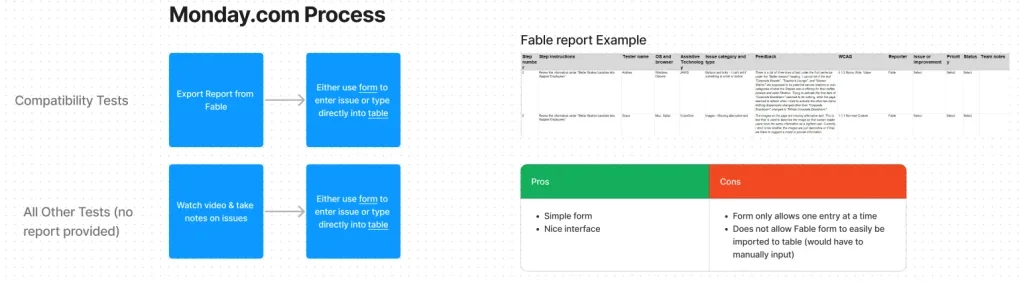
OPTION 1: MONDAY.COM
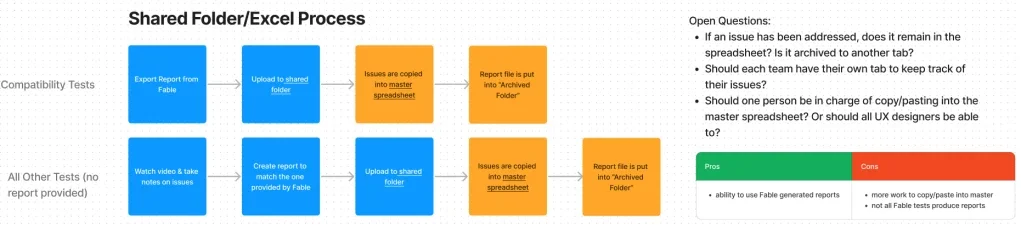
OPTION 2: EXCEL
OPTION 3: AIRTABLE
From Process to Practice
After multiple rounds of testing, Airtable proved to be the strongest solution.
I designed a workflow that gave each product team ownership of its accessibility work while contributing to a centralized system for tracking issues across the organization.
To support adoption, I introduced the workflow through team presentations, written documentation, recorded walkthroughs, and one-on-one coaching. I continued collecting feedback and refining the experience as teams integrated accessibility testing into their daily work.
Rather than becoming another process designers had to follow, accessibility became easier to incorporate into existing design practices.
COMPARISON TABLE
Operationalizing Accessibility
Designing an accessible experience extends beyond identifying usability issues. It requires repeatable processes that enable cross-functional teams to report, prioritize, and resolve accessibility defects efficiently.
After mapping the team’s existing workflow and identifying pain points, I redesigned the accessibility reporting process around Airtable. My goal was to create a system that was intuitive enough for anyone to use while capturing the technical details engineers needed to reproduce and resolve issues consistently.
1. Accessibility Issue Tracker
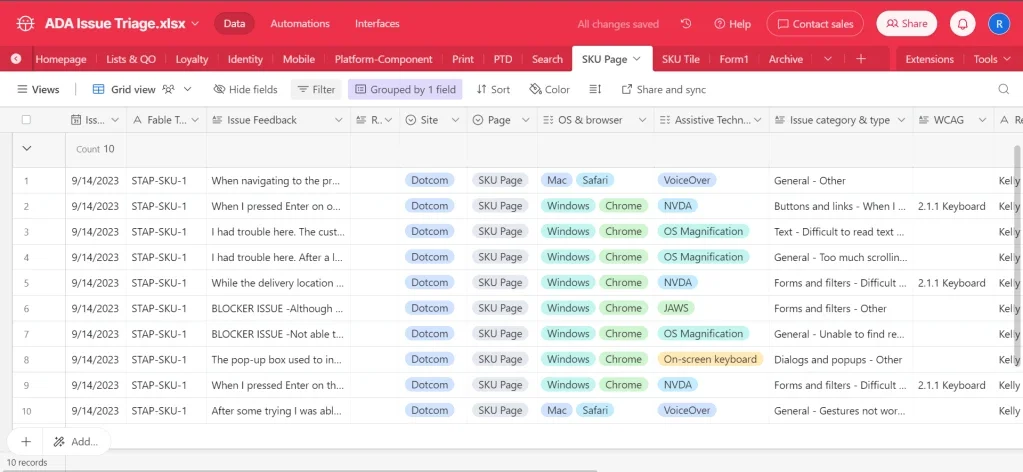
Each product team was given a dedicated Airtable workspace with a standardized reporting structure. Team members could quickly log accessibility issues using a simple intake form, capturing information such as the affected page, browser and operating system, assistive technology, WCAG success criteria, issue category, reproduction steps, and recommended fix.
Standardizing the information made accessibility issues easier to triage, assign, and track across multiple product teams while creating a single source of truth for accessibility work.
Figure 1. Centralized Airtable Issue Tracker
2. Creating a Self-Service Reporting Workflow
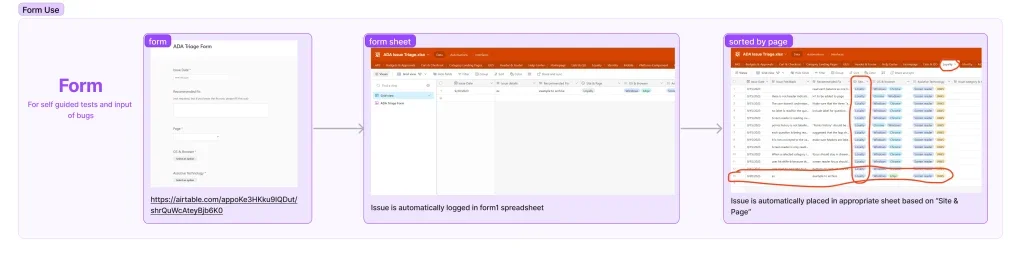
One of my primary goals was to reduce the effort required to report accessibility issues.
I designed a guided Airtable form that allowed designers, QA, and engineers to submit accessibility findings without needing to understand the underlying database structure. Once submitted, issues were automatically routed to the appropriate project and organized by product area, eliminating manual sorting while ensuring every report followed the same reporting standard.
This shifted the team’s effort away from administrative work and toward resolving accessibility issues.
Figure 2. Self-Service Accessibility Reporting Workflow
3. Standardizing Compatibility Test Imports
Accessibility compatibility testing generated valuable information, but importing those reports was inconsistent and time-consuming.
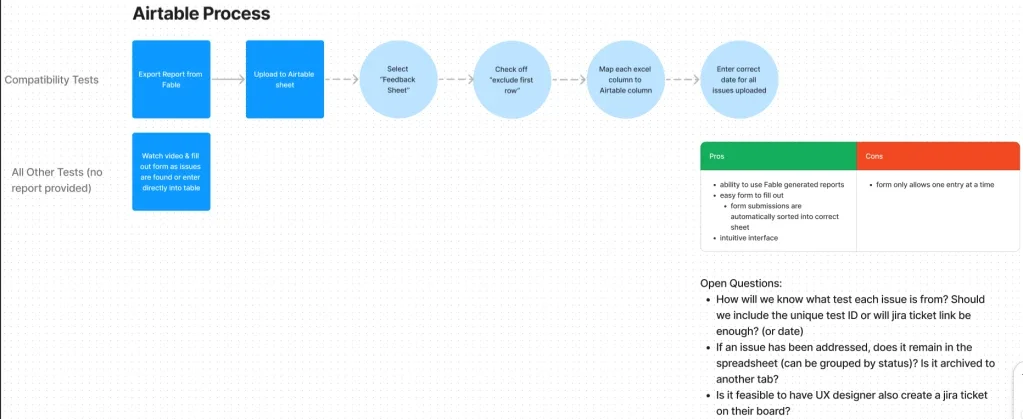
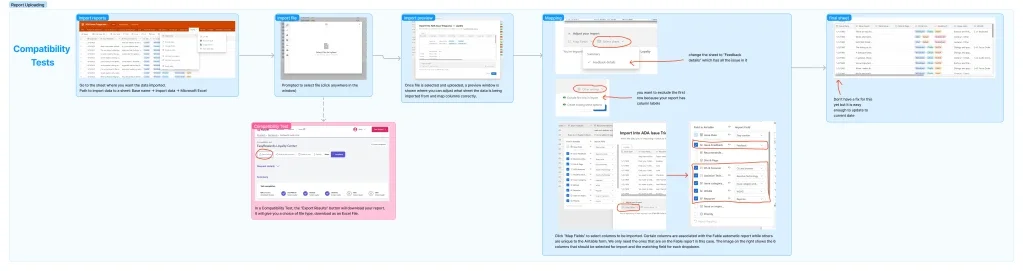
To streamline the process, I documented a repeatable workflow that guided team members through exporting reports from Fable, mapping the correct fields, and importing the results into Airtable without losing critical accessibility information.
Each step included annotated screenshots so teammates could complete the process independently, reducing onboarding time while improving consistency across projects.
Figure 3. Compatibility Test Import Workflow
4. Driving Team Adoption
Designing the workflow was only part of the solution.
To ensure long-term success, I introduced the new process during a team training session and walked everyone through each workflow step by step. I also created written documentation and recorded video tutorials so team members could reference the process whenever they needed it.
Rather than considering implementation complete after training, I scheduled one-on-one sessions with teammates to answer questions, gather feedback, and continuously refine the workflow based on real usage.
As confidence grew, more team members began incorporating Fable testing into their everyday work, making accessibility testing a natural part of product development rather than something performed only before release.
Impact
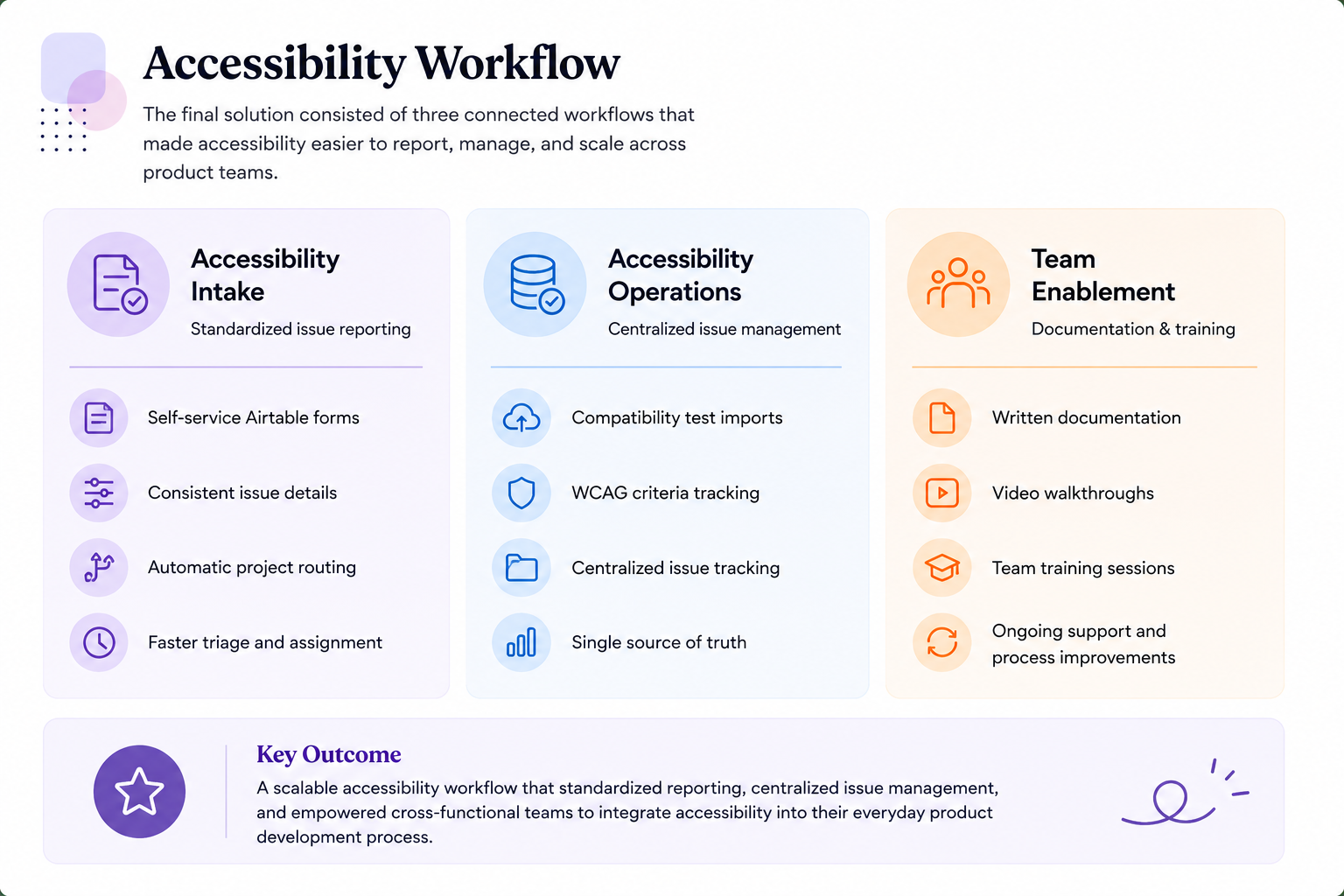
This work established the foundation for a more consistent and scalable approach to inclusive design across the UX organization.
Outcomes
Created a centralized accessibility knowledge hub for cross-functional teams
Standardized accessibility documentation and issue management
Increased adoption of accessibility testing throughout the design process
Clarified ownership between Design, Product, and Engineering
Built a repeatable workflow that supported continuous accessibility improvements
What I Learned
This project fundamentally changed how I think about accessibility.
Early in my career, I viewed accessibility as identifying and fixing usability issues. Through this work, I realized that lasting accessibility improvements come from designing systems that enable teams to do the right thing consistently.
Creating accessible products isn’t only about meeting WCAG requirements; it’s about building workflows, documentation, and processes that make inclusive design sustainable as organizations grow.
This experience strengthened my ability to combine UX strategy, accessibility expertise, systems thinking, and change management to create operational solutions that continue delivering value long after implementation.